

Most businesses do not have an AI problem. They have a work-design problem.
They buy a tool, run a few impressive demos, and then discover the same things still slow everyone down: unclear briefs, missing data, handoffs nobody owns, and no agreed definition of a good output. AI simply makes that messy system produce work faster.
An AI strategy fixes the system before it scales the output. It connects business priorities, repeated workflows, data, people, risk controls and measurement. It starts with one real business process, gives it a clear owner and quality gate, and measures whether the result is better than the old way.
This guide is for UK and US marketing, operations and services teams that want to move beyond “everyone has a chatbot” and build an AI programme that earns its place.
What this guide covers
An AI strategy does not need to begin as a 70-page transformation document. It does need to answer the questions that determine whether a pilot becomes a reliable business capability:
- Which business outcomes deserve attention first?
- Which workflows are suitable for AI, and which are not?
- What data, tools and people are needed to run them safely?
- How will the team review quality, risk and business value?
- What will change after the first pilot proves — or fails to prove — its case?
The playbook below provides a practical answer to each. Use it as a planning guide, not a promise that every workflow should be automated.
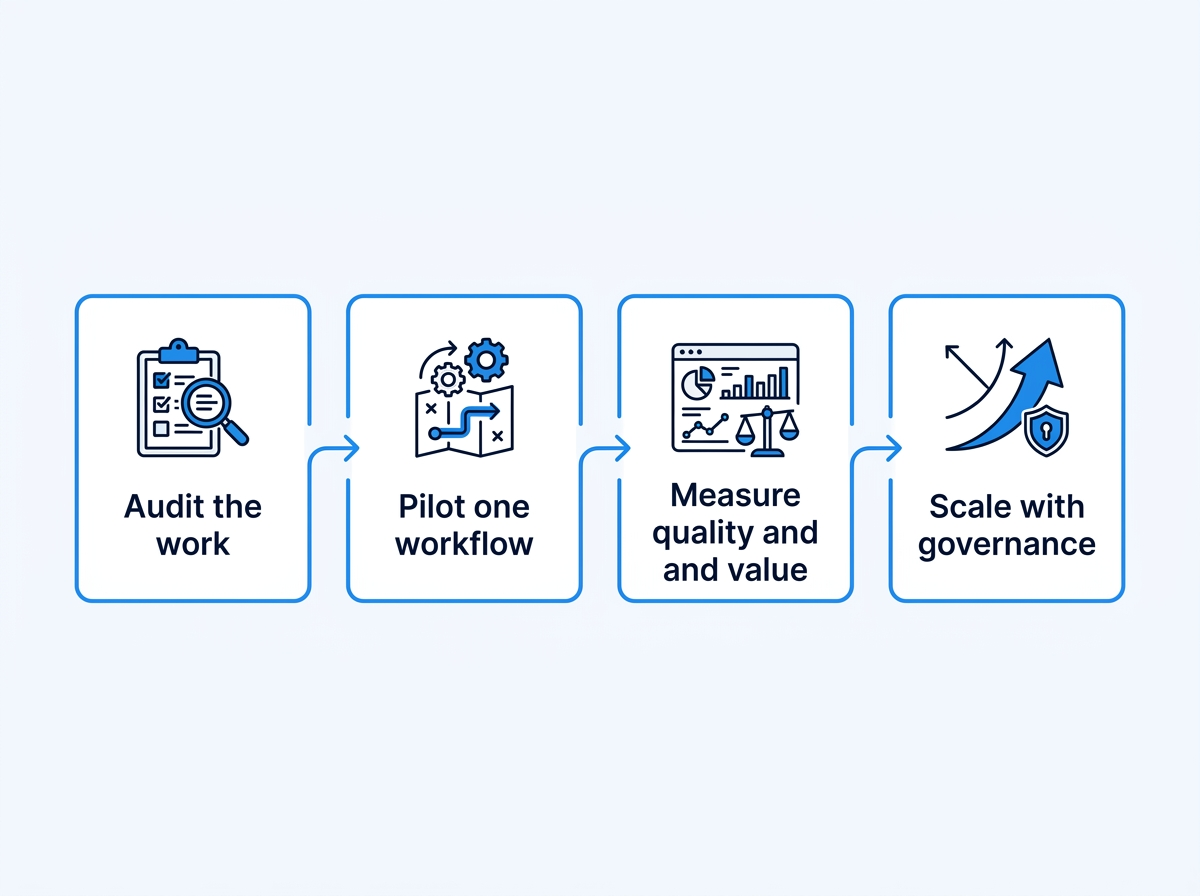
What is an AI workflow strategy?
An AI workflow strategy is a plan for using AI inside a defined business process. It states what enters the process, what the model is allowed to do, who checks the output, what tools or data it can access, and how success is measured.
That is different from an AI tool strategy.
A tool strategy asks, “Which model should we buy?”
A workflow strategy asks, “Where does a reliable result create enough value to justify changing the way we work?”
For most teams, the second question matters more.
What an AI strategy is — and is not
An AI strategy is a set of choices. It identifies the work worth changing, the capabilities needed to change it, and the guardrails that keep the change useful.
It is not any of the following:
- a list of models or subscriptions;
- a prompt library with no owner, review process or source material;
- an instruction to automate every task that can be connected to an API;
- a one-off innovation workshop;
- a compliance document that sits apart from how work is actually done.
The strongest strategy is specific enough that a team can act on it this quarter, and durable enough that it still makes sense when vendors, prices and model names change.
The five layers of a useful AI strategy
| Layer | Decision to make | Practical artefact |
|---|---|---|
| Business value | Which outcome should improve? | A ranked use-case portfolio |
| Workflow design | What work changes from trigger to approval? | A workflow contract |
| Data and technology | Which inputs, systems and permissions are needed? | Data and integration map |
| Governance | What can go wrong, and who is accountable? | Risk register and review rules |
| Adoption and measurement | How will people use it, and how will value be proven? | Training plan and scorecard |
If one layer is missing, the programme tends to lean too hard on the others. Technology without workflow design produces demos. Governance without adoption produces paperwork. Measurement without a business outcome produces activity reports rather than evidence.
Why AI pilots stall
Pilots commonly stall for predictable reasons:
- The problem is too broad. “Use AI in marketing” is not a workflow. “Turn a campaign brief and channel data into a reviewed weekly performance summary” is.
- No one owns the decision. A tool may generate a recommendation, but somebody must decide whether to use it.
- Quality is undefined. If the team cannot describe a useful output before the pilot, it cannot review one afterwards.
- The data is not ready. A model cannot reliably reason over inconsistent naming, missing context or access it should never have.
- Success is measured only in time saved. Saving time on bad work is not progress. Quality, risk and business impact matter too.
The aim is not to eliminate human work. It is to remove avoidable friction while making good judgement easier to apply.
Start with a business outcome, not a technology category
“We need an AI strategy” is usually a proxy for a more concrete frustration. Sales follow-up is slow. Reports arrive too late to change anything. Experienced people are trapped in repetitive research. Customer knowledge lives in inboxes. Content production has become a queue of approvals.
Write the outcome in plain language before you discuss tools:
| Weak starting point | Better strategic question |
|---|---|
| We should use AI for sales | Where does our sales team lose time before a qualified first conversation? |
| We need an AI content plan | Which content decisions are delayed because evidence, subject-matter input or approvals arrive too late? |
| We should build an agent | Which repeated decision has defined inputs, bounded risk and a measurable output? |
| We need a chatbot | Which customer question is frequent, answerable from approved knowledge and safe to escalate when uncertain? |
This change in language matters. It stops the strategy from being owned by a tool and gives it an owner in the business.
Build a portfolio, not a pile of ideas
Every organisation can find dozens of possible use cases. That is not a strategy. A strategy creates a portfolio: a small set of workstreams with different value, risk and readiness profiles.
Use three horizons.
| Horizon | Purpose | Typical examples | Decision rule |
|---|---|---|---|
| Horizon 1: improve work now | Reduce friction in an existing process | Draft reporting, research briefs, classification, knowledge retrieval | Pilot within one team and one quarter |
| Horizon 2: redesign a workflow | Change handoffs, roles or decision quality | AI-assisted campaign planning, lead research, service triage | Requires cross-functional owner and baseline data |
| Horizon 3: create a new capability | Offer a new product, service or operating model | Client-facing advisory product, proprietary insight workflow, AI-enabled service | Requires a stronger business case and governance review |
Do not let Horizon 3 consume all attention. It is attractive because it sounds transformative. Horizon 1 is where teams learn whether they can govern data, review outputs and measure value.
The use-case portfolio scorecard
Score every candidate from one to five. Use a cross-functional group: the workflow owner, someone who understands the data, the person accountable for risk, and the person who will actually use the output.
| Criterion | 1 = weak candidate | 5 = strong candidate |
|---|---|---|
| Business value | Convenience only | Directly improves a priority outcome or bottleneck |
| Frequency | Rare or unpredictable | Repeated daily, weekly or at meaningful volume |
| Output clarity | Nobody agrees what good looks like | Review criteria already exist or are easy to define |
| Data readiness | Inputs are unreliable, unavailable or unsuitable | Inputs are structured, permitted and traceable |
| Human reviewability | Error reaches a customer or decision immediately | A named person can review before impact |
| Change readiness | Team has no owner or capacity to test | Owner, users and sponsor will run the pilot |
| Risk profile | High-impact, sensitive or irreversible | Bounded, reversible and easy to escalate |
The highest total is not automatically the first pilot. A use case with high business value and high risk may need preparation. The ideal first pilot is valuable enough to matter, but safe enough to learn from.
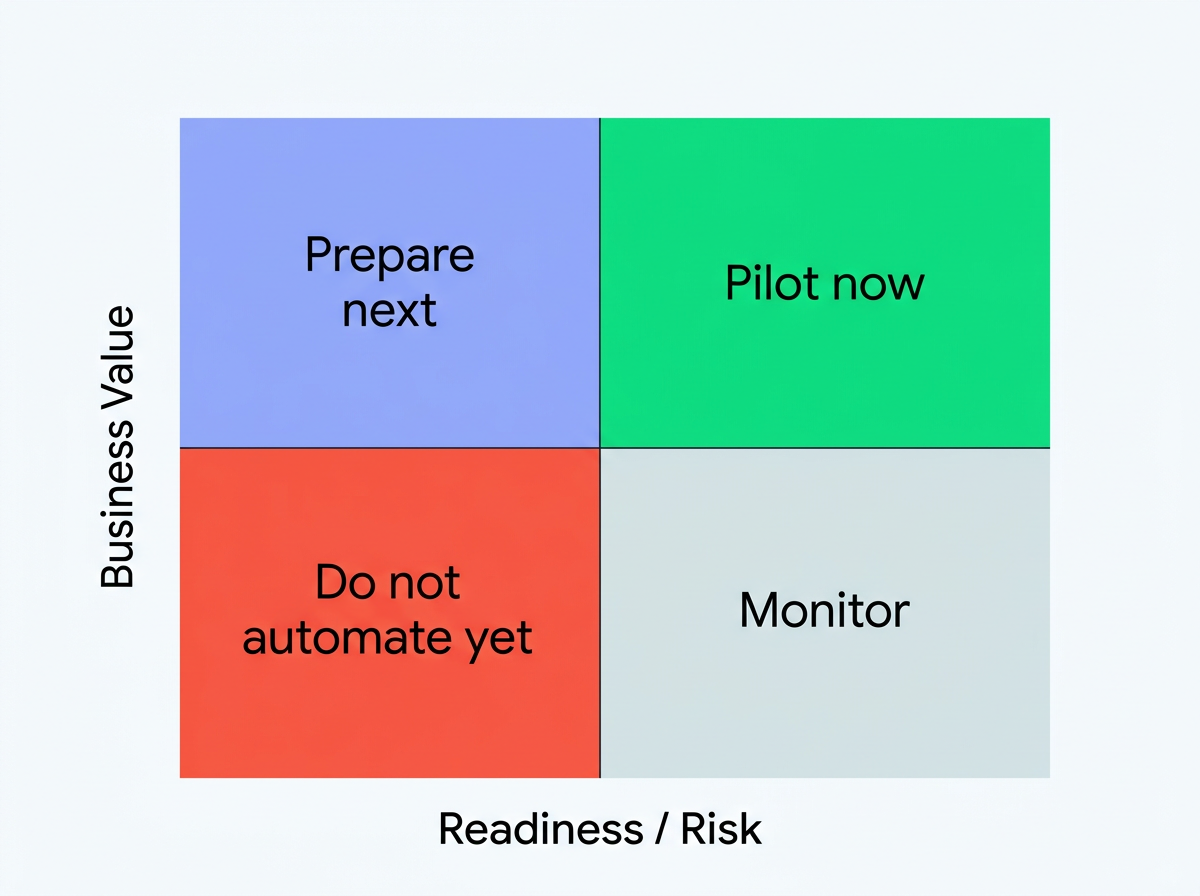
Step 1: audit the work before you automate it
Pick one workflow that happens at least weekly. The best first candidate has a clear beginning and end, a known owner and an observable cost when it goes wrong.
Use this five-part audit.
| Audit question | What to look for | Example answer |
|---|---|---|
| What starts the work? | A brief, form, email, report or event | A client approves the monthly campaign plan |
| What is the output? | A document, decision, record or action | A channel plan with budget, copy and tracking requirements |
| Where does work get stuck? | Waiting, rework, searching, copying or chasing | Account manager collects the same context from three people |
| What must remain human? | Approval, sensitive judgement, legal or brand decisions | Client-facing claims and budget changes |
| What proves success? | Quality, speed, revenue, risk or satisfaction | Fewer revision rounds and a plan ready before the weekly review |
A UK example: agency campaign reporting

The first AI workflow should not “manage campaigns autonomously.” It can collect approved exports, flag unusual changes, prepare a draft narrative and cite the rows behind each finding. The strategist approves every recommendation before it reaches the client.
The metric is not “how many minutes did AI write?” It is whether the report arrives on time, whether the cited figures are correct, and whether the team spends more of the meeting on decisions rather than data collection.
A US example: B2B services lead research

An AI workflow can turn the approved form data and public company information into a short research brief: company type, stated problem, buying signals and questions for the first call. A sales lead reviews the brief before it changes lead priority or enters a CRM field.
The test is whether reps reach the right leads faster without introducing inaccurate claims or personal-data risk.
Step 1b: map the workflow as it actually happens
Teams often map an ideal process, then try to automate it. Map the real process first. Include detours, repeated questions, spreadsheet copies and approval delays. Those are often the places where an AI workflow can help—or where it will fail because the underlying process is broken.
For each stage, capture:
| Workflow element | Questions to ask |
|---|---|
| Trigger | What event starts the work? Is it consistent? |
| Input | Which documents, fields or systems are used? Which are trusted? |
| Decision | What judgement is made, by whom and against what criteria? |
| Output | What does the next person need to receive? |
| Exception | What happens when data is missing, the model is uncertain or a case is unusual? |
| Record | Where is the decision, approval and final output stored? |
This is also the moment to find work that should not be automated. If a team cannot explain its own decision criteria, a model will not make the decision more reliable. Improve the process or create a review standard first.
Step 2: choose a pilot worth running
Score candidate workflows before you build them. A simple scorecard prevents the loudest idea from becoming the roadmap.
| Criterion | Score 1 | Score 5 |
|---|---|---|
| Frequency | Happens rarely | Happens every week or day |
| Clarity | Output is subjective or unknown | A good output has a clear standard |
| Data readiness | Inputs are scattered or restricted | Inputs are structured and permitted |
| Risk | A mistake would create serious harm | A human can catch errors before impact |
| Business value | Nice to have | Removes a costly bottleneck or improves a key decision |
Start with candidates that score highly on frequency, clarity and value, and low-to-medium on risk. A workflow with weak data or high regulatory sensitivity may still be important, but it is rarely the right first pilot.
Step 3: define the target operating model
An AI strategy needs a clear answer to a simple question: who does what once AI is part of the workflow?
The answer should not be “the AI does it.”
That describes a tool, not accountability.
The minimum viable operating model
| Role | Accountability | What they should not own alone |
|---|---|---|
| Executive sponsor | Connects the programme to a business outcome; removes blockers | Day-to-day prompt or workflow design |
| Workflow owner | Defines quality, accepts outcomes and owns process change | Security or legal judgement outside their remit |
| AI builder/operator | Configures instructions, integrations, testing and documentation | Final business approval |
| Data/security owner | Reviews permitted data, access, retention and supplier controls | The commercial value of the workflow |
| Reviewer | Checks material outputs before use or publication | Designing the entire system in isolation |
| End user | Uses the workflow and reports friction or failures | Being blamed for a poorly designed process |
In a small business, one person may hold several roles. The roles still need to be explicit. A named owner is more useful than a large committee with no decision rights.
Centralise standards, decentralise useful work
For many organisations, a hub-and-spoke model works well:
- A small central group sets reusable standards for approved tools, data handling, risk tiers, training and incident reporting.
- Individual teams own their workflows, their outcomes and their domain expertise.
- High-risk or cross-team decisions escalate to the appropriate security, legal, privacy or executive owner.
This avoids two common failures: every team inventing a different unsafe pattern, or a central innovation group becoming a bottleneck that never reaches real work.
Step 4: write the workflow contract
Before you choose a model or automation platform, write a one-page contract. This is the practical difference between an experiment and an operating process.
Workflow contract template
- Purpose: What decision or deliverable should become easier?
- Trigger: What event starts the workflow?
- Inputs: Which documents, fields and approved sources can it use?
- Output: What must it produce, in what format, and for whom?
- Guardrails: What may it not decide, publish, send or access?
- Human gate: Who checks it, and what triggers escalation?
- Success measures: What will improve if this works?
- Fallback: What happens if the workflow fails, is uncertain or lacks data?
This contract protects both speed and trust. It also makes vendor selection easier: choose the tools that meet the contract, not the tools with the loudest feature list.
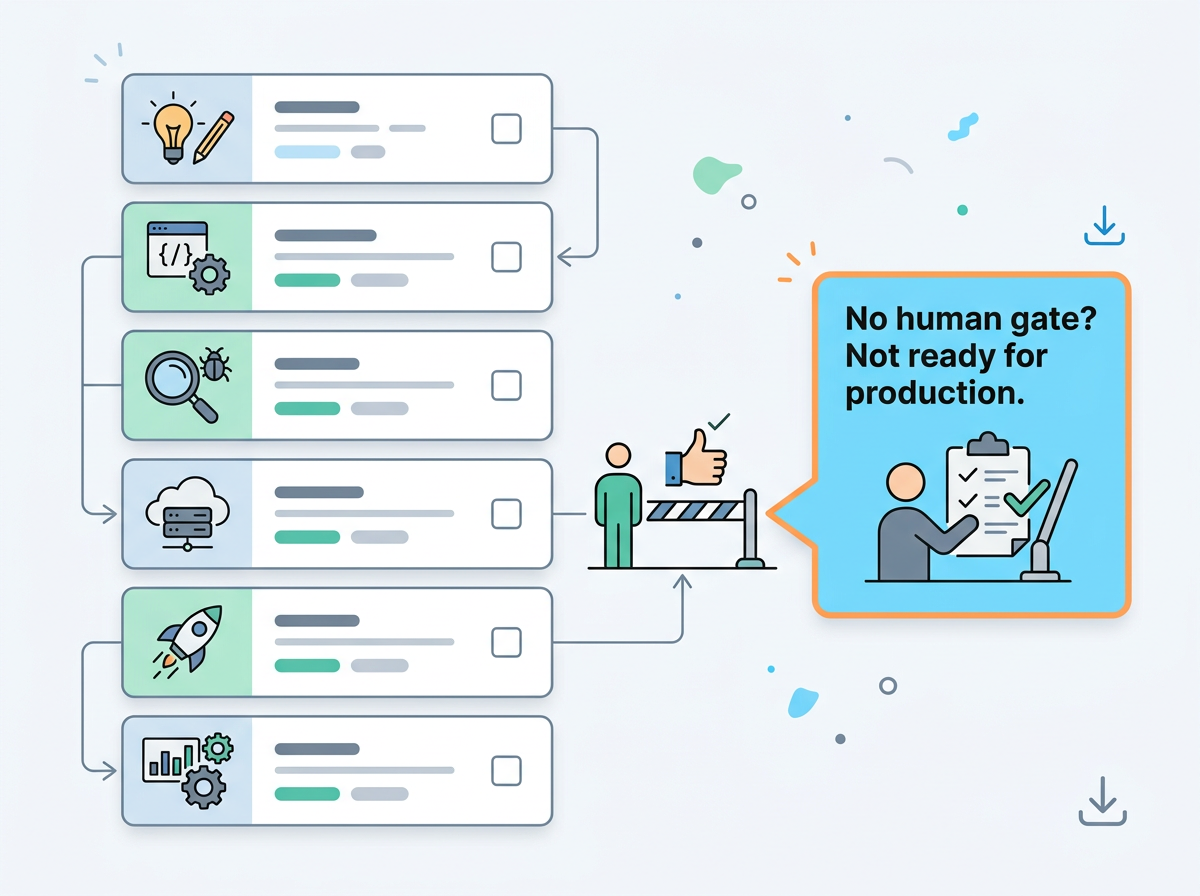
Step 5: design the data and technology boundary
Technology selection comes after workflow design. The team should know the job, inputs, review gate and expected output before it evaluates a model, platform or integration.
Create a data map for every workflow
For each input, record whether it is public, internal, confidential, personal, sensitive or regulated. Record where it comes from, who owns it, whether the supplier terms permit the intended use, and how long it should be retained.
| Data class | Example | Default approach |
|---|---|---|
| Public | Published website content or public reports | Verify source and freshness before use |
| Internal | Approved process documentation | Limit access to relevant users and keep a source of truth |
| Confidential | Client plans, commercial terms, unreleased strategy | Use only with approved tools and contractual review |
| Personal or sensitive | Customer, employee or health information | Perform privacy, security and legal review before use |
The rule is simple: do not send data to a tool merely because it is technically possible. Use the minimum data necessary for the workflow.
Separate the layers of the stack
| Layer | What it does | Strategic question |
|---|---|---|
| Source systems | Hold CRM, analytics, content, customer or operational data | Which records are authoritative? |
| Orchestration | Moves approved inputs and manages triggers | Can we log, retry and stop the workflow? |
| AI capability | Classifies, extracts, drafts, reasons or routes | What task and output format are allowed? |
| Human interface | Lets people review, correct and approve | Can a reviewer understand why the output exists? |
| Monitoring | Records quality, exceptions, cost and usage | Can we see drift before it causes harm? |
Do not require a complex platform for a first pilot. A simple, documented workflow with controlled inputs is usually better than a sophisticated automation nobody can review.
Step 6: run a small pilot with a real baseline
Give the pilot a narrow scope: one team, one repeatable task, one owner and a fixed review period. Run enough real examples to see patterns, not just one polished demo.
Capture a baseline before the pilot starts. For example:
- average turnaround time;
- number of revisions;
- error rate or exceptions found in review;
- time spent finding inputs;
- outcome metric that matters to the team, such as qualified meetings or on-time client reporting.
Then compare the pilot against the baseline. If the new workflow is faster but produces more review work, it has not yet earned scale.
Step 7: measure value in three dimensions
AI value is not a single number. Use three lenses.
| Lens | Question | Example measure |
|---|---|---|
| Efficiency | Did the workflow remove avoidable effort? | Time from request to reviewed output |
| Quality | Is the result more reliable or more useful? | Revision rate, factual checks passed, stakeholder rating |
| Business impact | Did better work change an outcome? | Faster follow-up, improved conversion, retained capacity |
Add risk to the review rather than treating it as an afterthought. Record inaccurate outputs, sensitive-data near misses, unapproved actions and cases where a human had to take over. A scalable workflow makes those events visible.
Step 8: govern, map, measure and manage risk
AI governance should make teams more effective, not less. The purpose is to set proportionate controls based on what the workflow does and what happens if it fails.
The U.S. National Institute of Standards and Technology’s AI Risk Management Framework is a useful reference because it organises risk activity around four functions: govern, map, measure and manage. Governance is designed to operate across the lifecycle, rather than appearing only at procurement or launch time. NIST AI RMF also publishes a Generative AI Profile for risks that are novel to or amplified by generative systems.
Translate that language into operational questions:
| Risk function | Plain-language question | Evidence to keep |
|---|---|---|
| Govern | Who is accountable and what standards apply? | Owner, risk tier, approved-tool policy, training record |
| Map | What can go wrong in this workflow and who could be affected? | Data map, workflow diagram, impact assessment |
| Measure | How will we test quality, security, bias, reliability and user impact? | Test cases, review samples, acceptance criteria |
| Manage | What changes when a risk appears? | Escalation path, rollback, incident and exception log |
Use risk tiers instead of one-size-fits-all rules
| Tier | Example | Minimum control |
|---|---|---|
| Low | Internal brainstorming from non-sensitive inputs | Clear user guidance and basic review |
| Moderate | Draft reporting or marketing copy using approved internal data | Named reviewer, source checks, logging and exception route |
| High | Customer communication, employee assessment, pricing or decisions affecting people | Formal risk review, stronger testing, documented approval and monitoring |
| Restricted | Use involving sensitive data, regulated decisions or irreversible action without reliable control | Do not proceed until specialist review and controls are in place |
Risk tiers do not replace legal or sector-specific requirements. They make it possible to apply judgement before a tool is connected to real work.
UK, US and EU-facing teams
The legal context differs by geography and sector. UK government guidance describes a principles-based approach that includes safety, transparency, fairness, accountability and contestability; the responsible regulator and obligations can depend on the use case. Read the GOV.UK guidance.
US obligations can vary by state, industry, contract and the type of data or decision involved. Teams serving EU clients should also check whether the EU AI Act applies to their deployment and current implementation timetable. This guide is not legal advice. In all markets, involve the appropriate privacy, security and legal advisers before using sensitive data or deploying a high-impact workflow.
Step 9: build AI literacy into the operating plan
AI adoption is a behaviour change project. People need more than access to a chat interface. They need to know what the workflow is for, where its limits are, what they must review and how to raise an issue.
Training should be role-based:
| Audience | What they need to learn |
|---|---|
| Leaders | How to choose outcomes, sponsor pilots and read evidence without chasing hype |
| Workflow owners | How to define quality, approve use cases and interpret exceptions |
| Everyday users | How to use approved tools, protect data, review outputs and escalate uncertainty |
| Builders | How to test, document, monitor and version workflows |
| Reviewers | How to check evidence, brand, risk and decision quality |
Avoid training that ends with “here are 20 prompts.” Give people a real task, the approved workflow, examples of good and bad outputs, and a clear escalation path.
A practical change-management sequence
- Explain the business problem, not just the technology.
- Invite users into workflow design before the build is final.
- Publish what the system does and does not do.
- Run a limited pilot and collect exceptions without blame.
- Share evidence of what improved and what did not.
- Update the workflow, training and controls before wider rollout.
People are more likely to use AI responsibly when they can see how it changes their work, what remains their judgement and how they can correct it.
Step 10: create a 30/60/90-day implementation plan
Strategy becomes real when it has a cadence. The following plan is intentionally modest: it is designed to create a reliable first capability, not to declare an organisation “AI transformed.”
| Period | Focus | Deliverables |
|---|---|---|
| Days 1–30 | Choose and design | Sponsor, use-case portfolio, workflow map, data map, success baseline, risk tier and workflow contract |
| Days 31–60 | Build and test | Configured pilot, test cases, review checklist, user training, exception log and weekly evidence review |
| Days 61–90 | Evaluate and decide | Comparison against baseline, documented results, lessons, go/no-go decision and next-workflow recommendation |
At the end of 90 days, the correct answer may be to stop. A stopped pilot that prevents wasted spend is evidence of good governance. If the pilot works, document the conditions that made it work before you replicate it.
Step 11: scale only after you can explain why it works
When a pilot works, resist the urge to copy it everywhere overnight. First document the conditions that made it work: input quality, review role, approved sources, prompt or instruction version, integrations and escalation rules.
Then scale in a deliberate order:
- Repeat the workflow with the same team and a wider sample.
- Train the next team on the contract and review criteria.
- Add monitoring for exceptions and drift.
- Review permissions, retention and contractual obligations with the appropriate UK or US advisers.
- Reassess the business case before connecting the workflow to irreversible actions.
For UK teams, this may include UK GDPR obligations and client data-processing terms. For US teams, the applicable requirements depend on state, sector and contractual commitments. This article is operational guidance, not legal advice; get appropriate counsel before processing sensitive or regulated data.
Measure the full business case
The strongest AI business case includes more than labour saved. It records the cost of setup, review and risk control as well as benefits that occur downstream.
A simple value model
| Component | Question | Example evidence |
|---|---|---|
| Baseline effort | What does the workflow cost now? | Time study, queue length, revision count |
| Build and run cost | What does it cost to configure, use, review and maintain? | Supplier cost, internal hours, monitoring effort |
| Quality change | Is the output more accurate, consistent or useful? | Review score, error rate, stakeholder feedback |
| Capacity released | What higher-value work can the team now do? | Faster response, more analysis, more client time |
| Commercial outcome | What changed in the business? | Conversion, retention, turnaround or risk reduction |
Avoid claiming causation too early. If a workflow improves reporting, it may contribute to better decisions; it does not automatically prove revenue impact. Write down the hypothesis, track the leading indicators and revisit the claim when enough evidence exists.
Metrics to review weekly and monthly
Weekly pilot review
- number of workflow runs;
- percentage completed without manual rework;
- exceptions by type;
- review time and quality issues;
- feedback from the people doing the work.
Monthly operating review
- progress against the business outcome;
- actual cost to run and maintain;
- changes to data, supplier or regulatory conditions;
- risk events and corrective actions;
- recommendation: continue, change, pause or scale.
The AI strategy dashboard
Leaders do not need a dashboard full of model usage. They need a portfolio view that supports decisions.
| Metric | Why it matters |
|---|---|
| Use cases by horizon and risk tier | Shows whether the portfolio is balanced |
| Active pilots with named owners | Prevents abandoned experiments |
| Baseline vs current quality and cycle time | Shows whether the workflow is genuinely improving |
| Exceptions and overrides | Reveals where the system is fragile or poorly scoped |
| Adoption by intended user group | Distinguishes access from useful use |
| Costs by workflow | Stops a low-value process from becoming expensive infrastructure |
| Decisions made | Makes governance visible: scale, change, pause or retire |
The dashboard should lead to a conversation, not a vanity report. If it does not change a decision, remove it.
A practical AI strategy template
Use the following outline for a working strategy document. Keep it short enough that owners will update it.
- Business objective: the outcome the programme supports.
- Audience and scope: teams, processes and markets included in the first phase.
- Portfolio: ranked use cases across the three horizons.
- Operating model: sponsor, workflow owners, reviewers and escalation routes.
- Data and tool principles: approved inputs, access, retention and supplier expectations.
- Risk model: tiering, review standards, incidents and restricted uses.
- Pilot plan: 30/60/90-day milestones, baseline and acceptance criteria.
- Measurement: efficiency, quality, business impact and cost.
- Adoption plan: training, communication, feedback and documentation.
- Review rhythm: weekly pilot review, monthly portfolio review and quarterly strategy refresh.
The practical test: can you explain the workflow without saying “the AI handles it”?
If the answer is no, the workflow is still too vague.
You should be able to say: “When this event happens, the system uses these approved inputs to prepare this draft. This person checks these criteria. We measure success this way. If it is uncertain, it stops here.”
That level of clarity is not bureaucracy. It is how a useful AI workflow becomes repeatable, auditable and worth trusting.
Common AI strategy mistakes — and what to do instead
| Mistake | Why it fails | Better move |
|---|---|---|
| Starting with a vendor bake-off | Teams choose a tool before defining value | Define the workflow contract, then test tools against it |
| Treating every pilot as a success story | Weak results are hidden and repeated | Use baseline data and make stop decisions acceptable |
| Automating a broken process | Errors and ambiguity simply move faster | Map the real workflow and fix the handoff first |
| Measuring only time saved | Quality, risk and business outcomes disappear | Use the full value model |
| Leaving governance to the end | Controls are added after data and workflows are already live | Risk-tier the use case before building |
| Training people on prompts alone | Users lack context, review skills and escalation paths | Train on real workflows and examples |
| Scaling a pilot without documentation | The second team recreates the first team's mistakes | Document inputs, review rules, exceptions and ownership |
Start with one workflow, not a transformation programme
The companies that get practical value from AI do not wait for a perfect enterprise strategy. They choose one meaningful process, make its quality standard explicit and build evidence from there.
Start with the work your team already repeats. Make the handoffs visible. Give the model a narrow job. Keep a person responsible for the decision. Then scale what proves itself.
FAQ
What is the best first AI workflow to automate?
Choose a frequent, well-defined task with approved inputs and a human review step. Reporting summaries, research briefs and first-draft content are usually safer starting points than autonomous customer communication or high-stakes decisions.
How long should an AI pilot run?
Run it until you have enough real examples to compare against a baseline and observe exceptions. A fixed number of cases is often more useful than an arbitrary calendar deadline.
Do small businesses need an AI governance process?
Yes, but it can be lightweight. A written workflow contract, approved data sources, named owner, review step and fallback procedure are a practical starting point.
Should we build an AI agent or automate a workflow first?
Start with a workflow. An agent is an implementation choice, not a business objective. If the process, inputs, decision rights and escalation route are unclear, adding autonomy will make the weakness harder to see.
How do we know whether an AI pilot should scale?
Scale only when it improves on a documented baseline, users can explain how it works, reviewers can catch meaningful errors, the owner accepts the operating cost and risks have a clear management path.


Discussion